A Practical Guide to Making Professional Videos From Audio Files
- 1 When Your Best Content Is Stuck in Audio Format
- 2 What AI Audio-to-Video Tools Actually Change
- 3 Matching the Tool to Your Creative Context
- 4 Step-by-Step: Building a Video From Your Audio Recording
- 5 Unlocking Music Content: Creating an AI Lyrics Video
- 6 Building Consistency Into Your Workflow
- 7 Final Thoughts
When Your Best Content Is Stuck in Audio Format
A lot of genuinely valuable content never reaches the audience it deserves because it exists only as audio. Recorded interviews, narrated explainers, scripted news segments, educational lectures — these formats are rich with information and craft, but they’re invisible on platforms that prioritize video in their algorithms and their user interfaces. Uploading a static image with a soundbar attached is technically a video, but it performs like one that nobody wanted to watch.
What AI Audio-to-Video Tools Actually Change
The shift that AI brings to this problem isn’t incremental — it’s categorical. Pollo AI’s audio to video capability lets creators take any audio recording and generate a fully realized video around it, complete with a photorealistic AI avatar that lip-syncs accurately to the spoken content.
The avatar handles the visual presence that would otherwise require a camera and a willing subject. Pollo AI’s audio to video tool is built to handle a wide range of creative contexts — storytelling, news-style reporting, educational content, branded marketing — and the output quality is consistent enough for direct publication without additional editing.
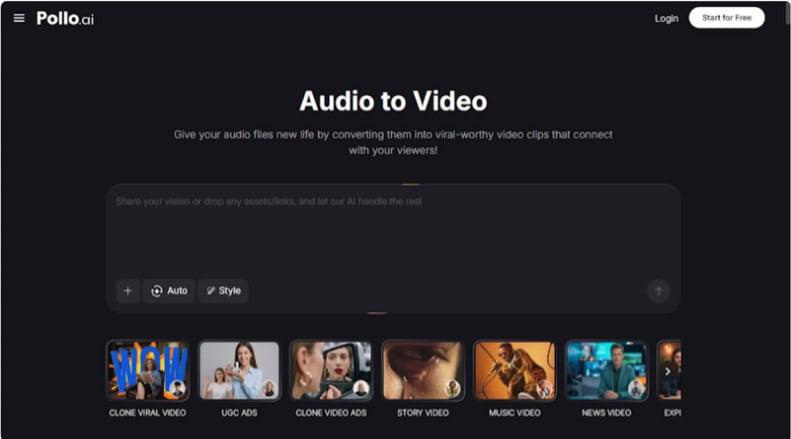
Beyond the avatar layer, the platform converts podcast recordings into short-form video content in a matter of seconds. You’re not exporting a raw clip and then editing it in a separate tool — the entire pipeline, from audio upload to finished video, runs inside a single workflow. For creators who are already producing audio regularly, this means every recording becomes a dual-format asset with almost no additional effort.
Matching the Tool to Your Creative Context
Not every audio file calls for the same visual treatment, and understanding the range of what’s possible helps you make better decisions before you start building.
News and current events content benefits from a clean, authoritative visual style — a professional-looking avatar in a neutral setting, minimal on-screen text, and a format that mirrors broadcast conventions. Educational and science communication content works well with a warmer, more approachable avatar paired with text highlights that reinforce key concepts as they’re spoken.
Storytelling and narrative audio — fiction, personal essays, documentary-style narration — opens up more creative visual territory, with dynamic backgrounds and expressive avatar styles that match the emotional arc of the piece. Knowing which category your content falls into before you open the editor saves time and produces more coherent results.
Step-by-Step: Building a Video From Your Audio Recording
Step 1: Edit Your Audio Before You Upload
The quality of your finished video is directly tied to the quality of your audio input. Before uploading anything, listen through your recording and trim any dead air at the beginning and end, remove any significant stumbles or restarts, and make sure the volume level is consistent throughout. A two-minute audio file that’s tight and well-paced will produce a noticeably better video than a three-minute file with the same amount of usable content spread thin.
Step 2: Start a New Project in Pollo AI
Log in to your Pollo AI account and create a new project. Select the audio-to-video workflow from the project type menu. The platform will prompt you to upload your audio file — accepted formats include MP3, WAV, AAC, and M4A. Once your file is uploaded, the waveform will appear in the editor, giving you a visual reference for the structure of your recording.
Step 3: Choose Your Avatar Style
Pollo AI offers a library of AI avatars that vary in appearance, age, presentation style, and default setting. Browse the options with your content’s tone in mind rather than just picking the first result. For a science explainer aimed at a general audience, you might choose an avatar that reads as approachable and knowledgeable.
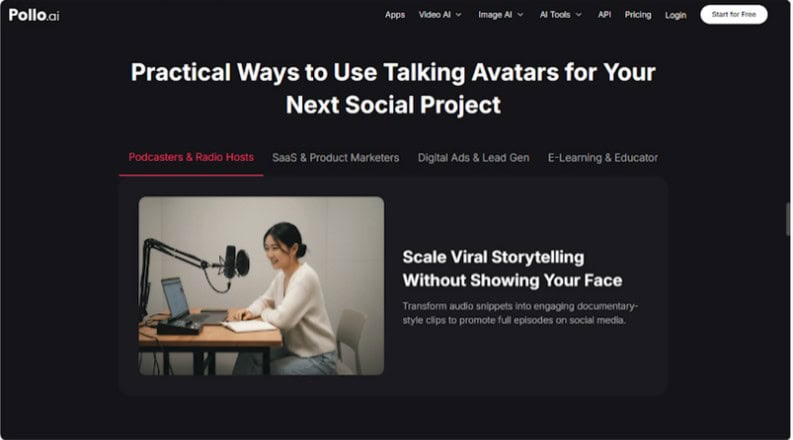
For a brand video or product walkthrough, a more polished, corporate-style presentation might serve better. The avatar you choose will lip-sync to your audio automatically — you don’t need to record any additional footage or make any manual timing adjustments.
Step 4: Set Your Background and Scene
Background scenes in Pollo AI range from clean studio environments to dynamic, animated settings that shift in response to the content. For most informational content, a clean and uncluttered background keeps the focus on the avatar and the message. For music-related or entertainment content, a more visually active scene can add energy and help the video stand out in a social feed.
Step 5: Configure Your Text and Caption Settings
Captions and text overlays are not optional extras — they’re a core part of what makes audio-to-video content perform well on social platforms where autoplay happens without sound. Enable auto-captions if the platform offers them, and add any additional text elements — a title, a key quote, a call to action — that will help viewers understand the content and take a next step. Keep text concise and readable at mobile screen sizes.
Step 6: Export and Distribute
Select your export format based on where you’re publishing. Vertical formats work for TikTok, Instagram Reels, and YouTube Shorts. Square formats suit Facebook and LinkedIn feeds. Widescreen is the standard for YouTube and embedded web video. Pollo AI’s export presets handle the technical specifications automatically, so you just select the destination and let the platform do the rest.
Unlocking Music Content: Creating an AI Lyrics Video
For musicians and music marketers, there’s a specific application of audio-to-video technology worth exploring separately. An AI lyrics video is one of the most consistently high-performing content formats in music promotion, and Pollo AI’s dedicated lyrics video generator brings it within reach for independent artists who don’t have a production budget.
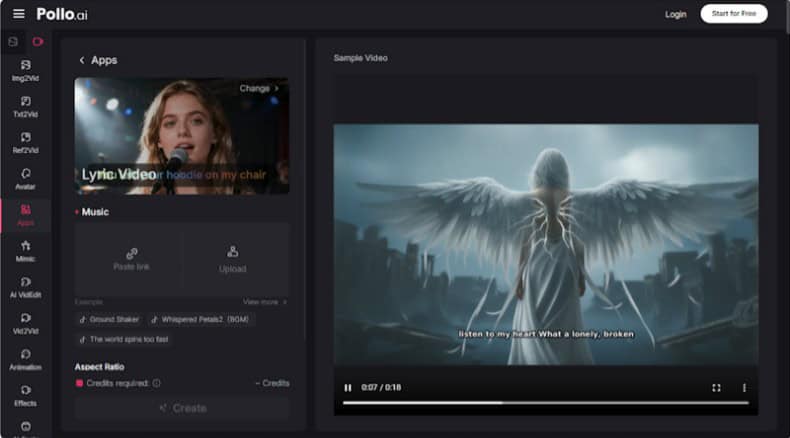
The workflow starts with your lyrics and your audio track. Enter the lyrics directly into the platform or upload your music file, and Pollo AI’s AI engine generates animated captions that synchronize with the vocals automatically — no manual timing, no frame-by-frame adjustments.
The platform selects dynamic visual scenes that fit the tempo and mood of the track, and you can add an AI avatar to give the video a performance dimension that pure text animation lacks. The finished AI lyrics video is export-ready and optimized for social sharing, with the kind of visual polish that typically signals a professional production.
The strategic value here goes beyond aesthetics. An AI lyrics video gives your audience a reason to watch, rewatch, and share — behaviors that drive algorithmic distribution on every major platform. For a release with no marketing budget, this kind of content can do real work.
Building Consistency Into Your Workflow
The creators who get the best results from audio-to-video tools are almost always the ones who build the process into their regular content schedule rather than treating it as an occasional experiment.
Set a simple rule for yourself: every piece of audio you produce gets a video version. A podcast episode becomes a 90-second highlight reel. A recorded interview becomes a news-style clip. A new song becomes an AI lyrics video published the same week as the audio release.
Over time, this habit compounds. Your content library grows across multiple formats and platforms simultaneously, your audience has more ways to discover your work, and the process itself becomes faster as you develop a feel for which visual choices work best for your particular content style.
Final Thoughts
Audio is where a lot of creative work begins — but video is where audiences are. Closing that gap no longer requires a production crew, a studio, or months of learning complex editing software.
With AI handling the visual layer, the workflow is genuinely accessible to anyone willing to spend a few minutes setting up a project. Start with one audio file, follow the steps, and publish the result. The gap between what you’re making and where your audience is waiting for it is smaller than it’s ever been.